
Virginia Tech Aerospace Engineer

Turning complex problems into hardware, airflow, and code.

I build across the physical and digital sides of engineering: an ionic wind thruster that turns Physics II concepts into measurable airflow, a STIHL 4-in-1 mechanical concept, Hess truck AutoCAD documentation, and a Surface Pen paste workflow that turns a missing Windows feature into a useful tool.

CAD Onshape, SolidWorks, Fusion 360 + AutoCAD
Code Python, MATLAB, Mathematica + AutoHotkey
Virginia Tech Aerospace engineering

Resume Snapshot

Engineer with a builder's range.

Virginia Tech Aerospace Engineering student with experience in CAD, MATLAB, prototyping, fabrication, and technical problem-solving across propulsion, wind energy, mechanical design, and software projects. Explore the projects on this site or view my full resume for more about my experience, skills, and education.

Open Resume

Featured Work

Projects that start with a problem worth chasing.

Interactive model - hover or click components to inspect the physics.

Propulsion / Electrohydrodynamics / Experimental Design

Ionic Wind Thruster

A high-voltage electrohydrodynamic thruster that turns Physics II electromagnetism into measurable airflow. A sharp positive nickel emitter and smooth negative copper collector create a strong field across an adjustable gap.

Near the emitter, air becomes ionized, ions accelerate through the field, and collisions transfer momentum into neutral air. I use measured wind speed to tune geometry, spacing, electrical connections, and repeatability from one version to the next.

The violet glow comes from excited and ionized air species in the discharge region, with nitrogen contributing strongly to the observed color.

~400 kV high-voltage potential
3.2 m/s measured airflow
+ to − field direction
Gap Tuning iterative geometry

Ask me about the design evolution, test setup, or physics tradeoffs behind the thruster.

Laws & Equations

F = qE

Ion force scales with charge and electric field strength.

E ≈ ΔV / d

Voltage, gap distance, and sharp geometry set the practical field strength.

F = k |q1q2| / r2

Background electrostatic interaction between charges.

U = qV

Particles exchange potential energy across the voltage difference.

KE = 1/2 mv2

Accelerated ions carry kinetic energy into the flow.

p = mv

Ion-neutral collisions produce the measurable wind output.

Why Geometry Matters

Sharp emitter features concentrate the field and improve ionization efficiency. The smoother collector, repeatable mounting, and gap tuning help stabilize the discharge and make airflow tests more comparable.

Design Iteration

Each revision targets higher airflow, stronger wind, cleaner electrical connections, better alignment, and more consistent ionization behavior. The current model is part of an ongoing optimization process.
  • Physics II
  • E&M principles
  • Electrode geometry
  • Ionization
  • Momentum transfer
  • Airflow measurement
Automation / Human Interface

Surface Pen Paste Workflow

Windows did not offer a built-in way to map the Surface Slim Pen top button to paste. After finding that the button used a proprietary Surface hardware channel instead of a detectable Bluetooth hotkey, I changed the system design: compile an AutoHotkey script into an EXE, map pen double-tap to launch it, send Ctrl+V, and exit instantly.

  • AutoHotkey
  • Windows Pen Settings
  • Ctrl+V workflow
  • Debugging
  • EXE trigger
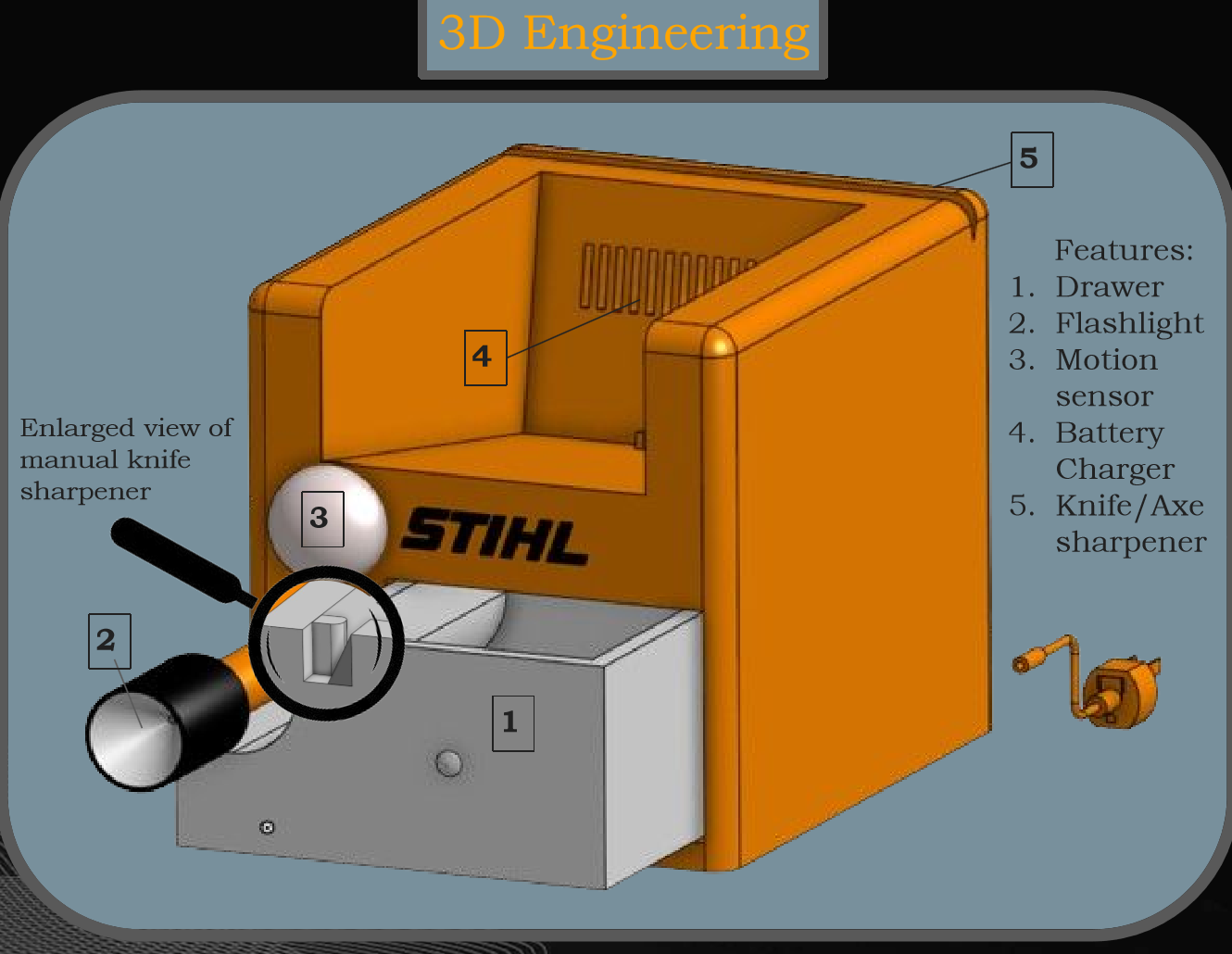
STIHL Four In One Lawn Tool presentation board
Feature 1

Drawer

Stores small loose items that do not have a home in a shed or garage.

Product Design / Mechanisms

STIHL 4-in-1 Project

An Onshape-modeled lawn-tool organization concept designed to free up garage or shed space by combining four useful functions into one compact STIHL-inspired product.

3 Mechanical Parts

  • Drawer: stores small loose items that do not have a home in a garage or shed.
  • Flashlight pop-out system: pushing the flashlight head releases it for use.
  • Manual single-sided blade sharpener: sharpens tools like shears and pruners.

4 Electric Parts

  • Battery charger: compatible with STIHL AK, AP, and AR series batteries.
  • Electric knife sharpener: sharpens dual-sided blades like knives and axes.
  • Infrared motion sensor: turns the flashlight on for three minutes when motion is detected.
  • Detachable flashlight: charges in the unit and can be used on the go.
  • 3D Engineering
  • Space saving
  • Mechanical systems
  • Electrical systems
  • Product presentation
Orthographic Drawing Set
Simple orthographic drawing example A simple block and circle object shown as isometric, side, front, and top orthographic views. 3D VIEW SIDE VIEW FRONT VIEW TOP VIEW
Technical Drafting / AutoCAD 2D / Reverse Engineering

Hess Truck Project

An individual high school engineering project focused on technical drafting and documentation. Using direct measurements from a real Hess truck, I recreated the vehicle in AutoCAD 2D and organized it into clean orthographic views.

The final drawing emphasized accuracy, selective dimensioning, and professional presentation. I was especially proud of how closely the finished document matched the original truck and how clearly it communicated the geometry in a formal drafting format.

  • AutoCAD 2D
  • Technical drawing
  • Orthographic views
  • Dimensioning
  • Measurement
  • Documentation
AutoCAD 3D Render
Interior Modeling / AutoCAD 3D / Visualization

Kitchen Design Project

A 3D kitchen modeling and rendering project completed in AutoCAD 3D. I built the major kitchen components individually, then assembled them into a complete interior scene from custom-made parts.

After modeling the scene, I applied materials and produced rendered views to present the final design. The project emphasized spatial layout, visual consistency, clean presentation, and a full 3D modeling-to-rendering workflow.

  • AutoCAD 3D
  • Rendering
  • Interior modeling
  • Materials
  • Scene design
  • Visualization
Airfoil Tools
MATLAB cleanup
SolidWorks-ready
Airfoil coordinate data cleaned into CAD-ready curves
MATLAB / Airfoil Data / Blade Design

Wind Turbine Blade Airfoil Processing

Processed airfoil coordinate data in MATLAB for a mini-scale floating wind turbine blade design, converting raw airfoil profiles into cleaner CAD-ready curves for SolidWorks modeling.

As part of the Virginia Tech Wind Turbine Team, I worked on blade design for a mini-scale floating wind turbine concept for the Great Lakes. I researched airfoil profiles, collected coordinate data from Airfoil Tools, reduced point density, and prepared curves that kept the profile shape usable for CAD workflow support.

Tools Used

MATLAB, SolidWorks, Airfoil Tools

Skills Demonstrated

Data cleanup, CAD preparation, blade design, and SolidWorks workflow support.

  • MATLAB
  • SolidWorks
  • Airfoil Tools
  • Blade Design
  • Data Processing
  • CAD Preparation
  • Team Project
CAD model
Pitch testing
CNC cut
Team Design / CAD / CNC Fabrication

The Electric Stick

The Electric Stick was a Virginia Tech engineering class final project where we designed, built, tested, and presented a low-cost, homemade instrument. The goal was an original, accessible instrument with simple tuning, amplified output, and about two octaves of playable pitch range.

The team moved from brainstorming and rough prototypes into CAD modeling, CNC fabrication, laser cutting, pitch testing, musician feedback, and a final presentation. The prototype worked and stayed low cost at about $41.59 in listed materials, while the final report honestly documented issues like string height, bowing, pickup stability, and future playability improvements.

Tools Used

SolidWorks, Fusion 360, CAD modeling, CNC fabrication, laser cutting, hands-on assembly, and pitch testing.

Skills Demonstrated

Team design, rapid prototyping, testing, cost analysis, design iteration, and documentation.

  • CAD
  • CNC
  • Laser Cutting
  • Prototyping
  • Team Design
  • Testing
  • Low-Cost Design
  • Musical Instrument Design
  • Design Iteration
  • SolidWorks
  • Fusion 360

How I Work

How I craft simple solutions to complex problems.

Each project below connects the way I think with the tools I used and the final thing I built, analyzed, or presented.

Filter by tool or output

Showing all projects across the engineering workflow.

Project

The prototype's electrical connections and sliding setup were not safe or reliable enough, so the focus was on improving connection stability, alignment, and repeatability.

Tested airflow, ring spacing, and mechanical constraints to determine what needed to change.

Created a more stable emitter/collector mounting concept and sliding adjustment system.

SolidWorksFusion 360Onshape3D Printing

Improved repeatability, alignment, and prototype usability.

Needed to reduce airfoil coordinate points so the profile could be plotted, 3D printed, and implemented for the wind turbine.

Gathered coordinate data with Airfoil Tools, then cleaned and reduced point sets in MATLAB.

Airfoil ToolsMATLAB

Prepared cleaner curves for SolidWorks blade modeling.

MATLABSolidWorks

3D printed and installed the airfoil blades on a mini-scale wind turbine designed for the Great Lakes region.

Needed an original, low-cost instrument that was easy to tune, accessible, amplified, and playable across about two octaves.

Brainstormed concepts, compared rough prototypes, reviewed showcase feedback, and used musician input to choose the string instrument direction.

Moved from sketches into CAD, then CNC-machined the white PVC decking body with strings, tuning hardware, an output jack, and a laser-cut wooden backing.

SolidWorksFusion 360CNCLaser Cutting

Documented the project, finished on time, presented it in class, and played a song to prove the instrument worked.

Multiple garage tools take up space and create storage clutter.

Planned a compact multi-function product combining charging, sharpening, lighting, sensing, and storage.

Created a fully parametric CAD model and engineering drawings.

Onshape

Prepared the concept for presentation with drawings, visuals, and product explanation.

Presentation

Needed to model a complete interior space with realistic component placement and materials.

Planned layout, dimensions, and appliance components to go in the kitchen.

Made each kitchen part separately and assigned materials to each component in the part assembly.

AutoCAD 3D

Created an assembly, placed all parts in the kitchen, set up camera angles, and produced rendered visuals.

Needed to document a real object accurately from direct physical measurement.

Measured major and small features, then planned clean orthographic views and selective dimensions.

Recreated the truck as a precise AutoCAD 2D technical drawing.

AutoCAD 2D

Produced a clean dimensioned drawing sheet with professional drafting presentation.

Needed to analyze an open-section thin-walled beam with and without stringers.

Broke the geometry into wall segments and moved between local/prime and global coordinate systems.

Mathematica

Calculated centroid, translated component locations, inertias, first moments, shear flow, branch forces, and shear center locations.

Mathematica

Organized symbolic workflows and equations into a final aerospace structures analysis document.

Needed a simple way to compare monthly income, expenses, and debt payments before making savings decisions.

Planned the decision flow for spare cash, debt payments, savings options, and growth projections.

Built a Python program with functions, user input, calculations, conditionals, loops, and formatted output.

Python

Organized the program into readable reusable pieces and presented one-year and three-year savings projections.

Windows did not provide a simple way to map the Surface Pen top button directly to paste.

Investigated the pen input path and found the button used a proprietary Surface hardware channel.

Built an AutoHotkey executable that sends Ctrl+V and exits instantly when launched.

AutoHotkey

Mapped pen double-tap to the executable, creating a fast and reusable paste workflow.

Expanded Project Proof

Ionic Wind Thruster Redesign

A wind propulsion prototype that used multiple prototypes, test observations, and theory to create faster airflow and opposite-direction thrust.

  • SolidWorks
  • Fusion 360
  • Onshape
  • 3D Printing
Final Output

More repeatable emitter/collector alignment and a prototype setup that was easier to adjust and test.

View Project

Next Step

Ready for internships, lab work, design teams, and hands-on engineering challenges.

Explore the resume, reach out about project work, or connect around aerospace, mechanical design, automation, and hands-on prototyping.

Hello and thanks for visiting my website! This website was made almost entirely with AI because I wanted to show you all how effective I can be at using it. I know AI is being used more and more in jobs, school and everyday life. I thought a website would be a great way to showcase my understanding of it and its capabilities with what it can accomplish with A LOT of prompting. If you have any more questions, feel free to contact me!